
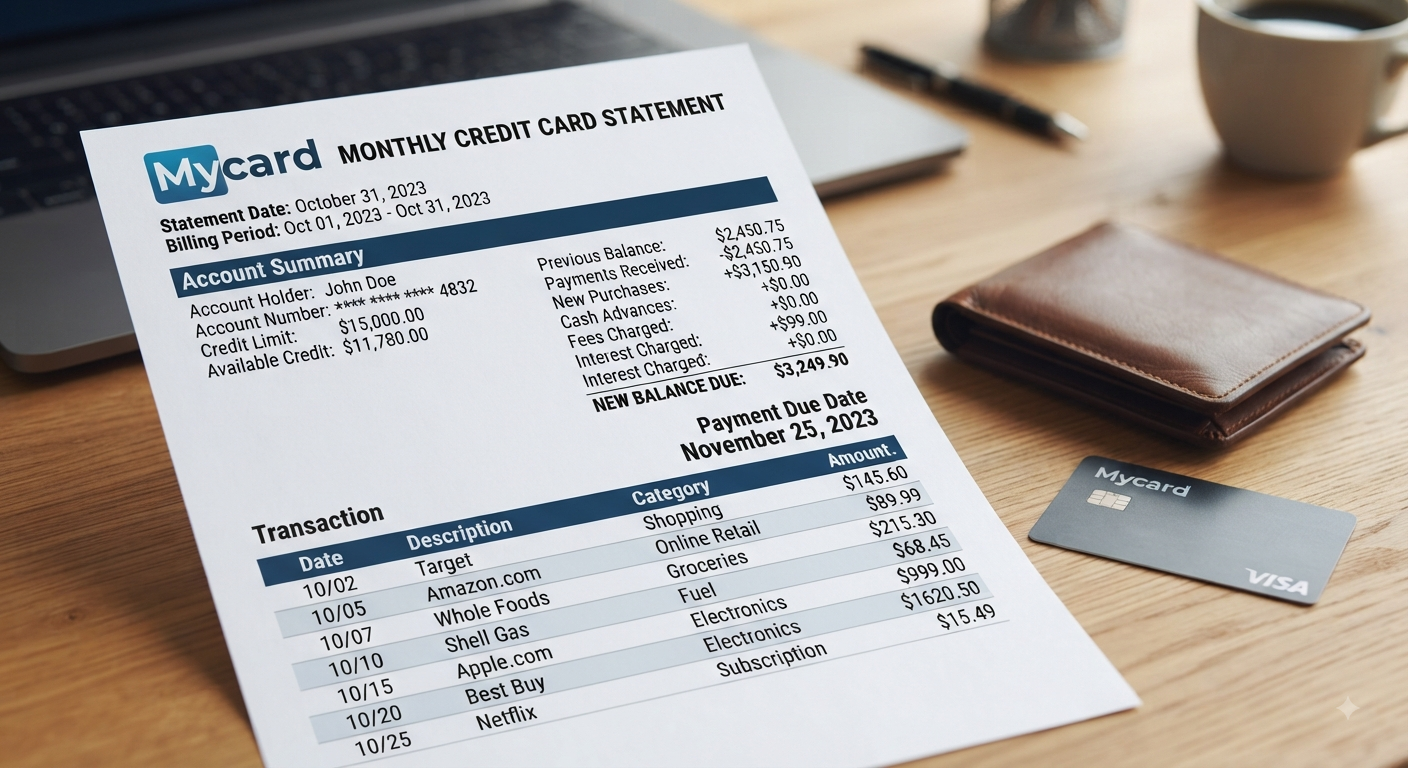
Mycardstatement.com is an online credit card account-management portal used by cardholders whose financial institutions participate in the service. Instead of visiting a bank’s ordinary online-banking dashboard, eligible cardholders may be directed to this separate platform to review balances, inspect transactions, access statements, make payments, and manage other credit card functions.
That distinction matters. MyCardStatement is not simply a page for reading a monthly bill. Financial institutions that use the service describe functionality including payments, transaction monitoring, spending reports, electronic statements, account alerts, and—in some programs—credit-score access.
This guide explains what the portal actually does, how enrollment and login work, what to check before entering card information, and what to do when something goes wrong.
What Is Mycardstatement.com?
Mycardstatement.com is a web-based credit card management service associated with FIS payment technology. The official MyCardStatement mobile application is published by FIS Payments, with Fidelity National Information Services, Inc. identified as the developer.
Participating banks and financial institutions direct eligible credit card customers to the platform rather than requiring each institution to build an entirely separate card-management interface. For example, TCM Bank links cardholders directly to MyCardStatement for online credit card management, while First American Bank describes the destination as its credit card processor’s site.
That means the portal should not be confused with your bank’s primary checking or savings account login.
Your credit card credentials may be separate.
First American Bank explicitly states that the username and password created for the service are independent of credentials used for its regular Internet banking system.
What Can You Do Through the Portal?
The exact features available can depend on the institution and card program, but commonly documented functions include:
- Check your current credit card balance
- Review recent and historical transactions
- Access previous credit card statements
- Make credit card payments
- Monitor spending activity
- View spending reports
- Set account alerts
- Enroll in electronic statements
- Manage paperless billing
- Access account information from compatible mobile devices
- View a credit score where supported by the card program
TCM Bank, for example, lists payments, balances, transactions, spending reports, alerts, eStatements, and credit-score access among the available online-account features.
This makes the platform considerably more useful than a basic statement viewer.
How to Use the Mycardstatement.com Login
Existing users can access Mycardstatement.com using the credentials established during enrollment. The most important first step is surprisingly simple: verify that you are actually on the correct domain before typing a username, password, card number, or other personal information.
Financial-login pages are attractive targets for phishing. Avoid reaching your account through an unfamiliar link in an unsolicited email or text message.
When possible, use the address supplied directly by your issuing institution or navigate through your bank’s official website.
Mycardstatement.com Login Steps
For an enrolled account, the normal workflow is straightforward:
- Go to the official MyCardStatement website.
- Locate the account login area.
- Enter your registered username.
- Enter your password carefully.
- Complete any security verification presented by the site.
- Select the login option.
- Confirm that the account information displayed belongs to your card.
Once inside, review your balance and recent activity before moving directly to the payment screen. That small habit can help you catch suspicious charges sooner.
Research into credit and debit card fraud has found that account or statement review can play an important role in fraud detection, reinforcing the value of regularly checking transactions rather than looking at an account only when a bill is due.
How to Register at Mycardstatement.com
New users generally need to enroll before they can use the normal login form.
The official enrollment page requests a credit card number and explains that this information is used to verify that the cardholder belongs to the participating institution.
This is another reason to confirm the domain before submitting information.
What You May Need During Enrollment
Have your physical card and account details available. Depending on the enrollment flow and issuing institution, additional identity-verification information may also be requested.
The process typically involves establishing account credentials after your card relationship has been verified.
Do not assume that your normal bank username will automatically work. As noted earlier, some participating institutions specifically tell customers that their Mycardstatement.com credentials are separate from their standard online-banking credentials.
Enrolling in Paperless Statements
Account registration and paperless-statement enrollment are related but may be separate actions.
Cumberland Valley National Bank & Trust describes a paperless process that involves signing in, going to the statements area, choosing the paperless or statement option, selecting electronic billing, accepting the applicable terms, and receiving confirmation.
Paperless billing can make older statements easier to retrieve without storing piles of mailed documents.
How Mycardstatement.com Payments Work
One of the most important reasons cardholders use Mycardstatement.com is bill payment. Multiple participating banks confirm that online payments are supported through the platform.
Before submitting any payment, verify three pieces of information:
- Payment amount
- Selected funding account
- Payment timing or effective date
Do not automatically assume that scheduling a payment means the money has already left your bank account. Processing rules and posting times can vary, so keep enough funds available until the transaction is actually completed.
Minimum Payment vs. Statement Balance
Understanding what you are paying matters as much as making the payment itself.
Your minimum payment is the amount required under the terms of your card account to keep the account from becoming delinquent. The statement balance represents the balance shown for the completed billing cycle.
Depending on your account terms, paying only the minimum can leave a substantial balance subject to interest.
Check the actual card agreement and statement issued by your financial institution rather than relying on a generic online explanation of interest or payment requirements.
Always Save Payment Confirmation
After paying through Mycardstatement.com, retain the confirmation details until the payment appears correctly on the account.
For important or unusually large payments, also check your funding bank account.
You want both sides of the transaction to agree.
Understanding Your MyCardStatement Credit Card Statement
A credit card statement should be treated as a financial-control document, not merely a bill.
When viewing a statement, examine more than the final amount due.
Pay attention to:
- Previous balance
- Payments received
- Purchases
- Credits or refunds
- Fees
- Interest charges
- Current or statement balance
- Minimum payment
- Payment due date
- Available credit
- Transaction dates
- Merchant descriptions
The portal lets participating users review current and past statements, balances, and spending information online. CVNB specifically highlights statement access, balance review, payments, and spending analysis.
Why Transaction Review Matters
A $9 charge can deserve more attention than a $900 charge if you do not recognize it.
Look for duplicate transactions, recurring subscriptions you thought were canceled, unfamiliar merchant descriptors, incorrect refunds, and purchases you did not authorize.
If a transaction looks suspicious, do not rely exclusively on a Google search for the merchant name. Contact the number associated with your card issuer or use an authenticated support method to investigate it.
Is Mycardstatement.com Legit?
For eligible cardholders, Mycardstatement.com is a genuine account-management destination referenced by established financial institutions.
TCM Bank links directly to the service for online account management. Cumberland Valley National Bank & Trust also directs its credit cardholders there, and First American Bank tells customers to enroll there to access credit card activity.
The mobile application provides another useful verification point: Google Play identifies FIS Payments as its publisher and Fidelity National Information Services, Inc. as the developer.
Still, legitimacy of the real service does not make every similarly named website legitimate.
Watch for Look-Alike Domains
Search results may contain independent sites using names similar to MyCardStatement.
A safer practice is to check the exact destination your financial institution provides before submitting sensitive information.
Be particularly cautious when a page:
- Uses a slightly altered domain name
- Arrives through an unexpected email or SMS link
- Requests information your normal login does not require
- Pressures you to act immediately
- Asks you to send passwords through email
- Requests remote access to your computer
- Tells you to pay a fee simply to unlock an online account
Financial credentials should never be entered casually just because a page contains a familiar logo.
Mycardstatement.com Security: Smart Practices for Cardholders
Because Mycardstatement.com deals with credit card account information, basic security habits have a direct financial impact.
Start with a unique password. Reusing the same password across email, shopping, banking, and card websites creates unnecessary exposure if one unrelated service is compromised.
A reputable password manager can help maintain unique credentials without forcing you to memorize every password.
Never Share Login Credentials by Email
First American Bank warns customers that it will not email or call requesting their account number, password, or ATM PIN.
Treat unexpected requests for financial credentials as suspicious—even when the message looks professionally branded.
Instead, open your browser independently and access the trusted site yourself.
Review Statements Regularly
Do not wait until the payment due date.
A useful routine is to check account activity several times during the billing cycle and perform a deeper review when the monthly statement becomes available.
Alerts can complement this habit. TCM Bank confirms that account alerts are among the management tools available through MyCardStatement for its cardholders.
What to Do If Mycardstatement.com Is Not Working
Login trouble does not necessarily mean your credit card account is compromised.
Common causes can include incorrect credentials, a locked online account, browser problems, temporary service issues, or confusion between regular bank credentials and the separate card-management login.
Start with the simplest checks.
Check Your Credentials
Make sure you are entering the username created specifically for the card-management service.
If your financial institution maintains separate banking and credit card authentication systems, your normal online-banking password may not work.
Clear Browser Problems Carefully
If the page loads incorrectly, try:
- Closing and reopening the browser
- Using a private browsing window
- Checking whether cookies are blocked
- Clearing cached website data
- Temporarily disabling extensions that may interfere with authentication
- Trying another supported browser or device
Avoid repeatedly guessing passwords. Repeated failed login attempts can make an access problem worse.
What If Your Account Is Locked?
The official FAQ currently instructs users who need to unlock an online account to call 866-604-0380 and states that, for security reasons, account unlocking cannot be completed online or by email.
Because phone numbers and support procedures can change, verify support information on the official site or your card before calling.
That is especially important when money or identity information is involved.
MyCardStatement Mobile App: What to Know
People who prefer mobile account access can use the MyCardStatement application where their account is supported.
According to its Google Play listing, the app allows users to view account balances, transaction history, and make payments. The listing identifies FIS Payments as the publisher and shows that the app was updated on May 15, 2025.
The mobile experience, however, should not automatically be assumed to work identically for every cardholder.
Recent Google Play reviews include users reporting mobile-login problems even when web access worked. These are individual user reports rather than proof of a system-wide issue, but they suggest that the website can be a useful fallback when app access fails.
Mycardstatement.com vs. Your Bank’s Online Banking
It is easy to assume the two systems are interchangeable. They may not be.
Your bank’s main digital platform can manage checking accounts, savings accounts, transfers, loans, or other banking products. Mycardstatement.com focuses on supported credit card accounts.
A cardholder might therefore have:
Bank login → checking, savings, transfers, deposits
Card portal login → card balance, statements, spending, payments
This separation explains why a password that works perfectly on a bank’s home page may fail on the card portal.
Before resetting anything, confirm which system you are actually trying to enter.
How to Get More Value From MyCardStatement
Logging in once a month just to pay the minimum wastes much of the information available in your account.
Use the portal as a monitoring tool.
A practical monthly routine is:
- Review new transactions for unfamiliar activity.
- Compare spending against the previous billing period.
- Check recurring subscriptions.
- Verify credits and refunds.
- Read the statement balance and due date.
- Make or schedule your payment.
- Save the confirmation.
- Download statements you need for your records.
- Enable useful alerts where available.
That workflow turns a simple card-payment website into a basic spending-control system.
Frequently Asked Questions About Mycardstatement.com
Is Mycardstatement.com an official credit card website?
Mycardstatement.com is a legitimate credit card account-management platform used by participating financial institutions. Banks including TCM Bank, CVNB, and First American Bank publicly direct eligible cardholders to the service. The associated MyCardStatement mobile app is published by FIS Payments.
Always verify that your own card issuer supports the platform before entering card information.
Why can’t I log in with my regular bank password?
Your card portal credentials may be completely separate from your online-banking credentials. First American Bank explicitly tells its customers that the username and password selected for MyCardStatement are independent from the credentials used for its Internet banking system.
If you are unsure, use the enrollment or recovery options associated with the card portal instead of repeatedly entering your normal bank password.
Can I pay my credit card bill on MyCardStatement?
Yes, supported cardholders can make payments through the service. TCM Bank and CVNB both identify online payment as one of the available MyCardStatement account-management functions.
Always review the amount, funding source, and confirmation details before assuming a payment has been completed.
Can I access old statements online?
Participating cardholders can access credit card statements through the portal. CVNB says its users can view current and past statements, while electronic or paperless billing can also be enabled for supported accounts.
Keeping electronic statements can be useful for budgeting, transaction research, tax documentation, and resolving billing questions.
What should I do if my MyCardStatement account is locked?
The official FAQ currently directs users with a locked online account to contact 866-604-0380 and notes that the account cannot be unlocked online or by email for security reasons.
Before disclosing account information, verify the phone number through the official website, your financial institution, or the customer-service information printed on your card.
Final Takeaway
Mycardstatement.com can be much more useful than a place to check a bill. For participating cardholders, it provides a centralized way to monitor transactions, review statements, understand spending, manage electronic billing, receive available alerts, and submit credit card payments.
Use it deliberately. Access the portal through a trusted source, keep separate and unique credentials, inspect transactions throughout the month, verify every payment before closing the page, and contact authenticated card support immediately when something does not look right.
The best next step is simple: confirm that your issuing financial institution uses MyCardStatement, access the official portal through the bank or trusted domain, review your latest transactions, and make sure your account details and statement activity are accurate.













Leave a Reply